Wednesday, March 25, 2015

How do you say...

Okay folks, pet peeve time. I admit, I mispronounce some words. I’ve been guilty of saying “on premise” when in fact the correct term is “on premises” (this particular one has gotten a lot of air time in my Twitter stream recently). There are a couple of words that I overheard and thought “wow, do I say that word wrong, or is [redacted] saying it wrong?” Read and heed. Comments? You know the drill.

1. Chassis - Don’t say it like it looks in the English language. It’s pronounced “chassy” (ryhmes with “classy” and originates from French). BONUS: The plural for this word ends in the Z sound. Ref: http://www.merriam-webster.com/dictionary/chassis 

2. Silicon - There are actually two ways to say this, but “silicone” with a long O sound isn’t one of them. Silicone is a Carbon-chain polymer used in caulks, adhesives, and, well, other things. Silicon’s correct American-English pronunciations can be heard here: https://www.youtube.com/watch?v=vlbSxSqRgg4

Monday, March 9, 2015

Aruba Atmosphere 2015 Conference - Review And Feedback

I’m very fortunate to work for an employer that sends me to conventions to “get smart” and bring it back to apply to our IT systems. Having just concluded my first Aruba Atmosphere conference at The Cosmopolitan Hotel in Las Vegas, I wanted to take a few minutes to summarize my experience and provide feedback to the great people that organized and ran the event.

On-Site Registration

From the first day at on-site registration, I felt very welcome. I had received an e-mail with a bar-code to use at check-in, but I hadn’t yet seen it or printed it, so I simply searched for myself by name in the system on a touch-screen kiosk. They system printed my badge and a member of the event staff gave it to me with a lanyard and directions across the room. At that booth I had my badge scanned and received an Atmosphere 2015 bag with my requested t-shirt size.

Certified Training

Although the conference didn’t officially kick-off until Monday evening’s welcome reception, I arrived early for a 2+ day training class. I attended the WLAN Fundamentals class taught by Kimberly Graves (@kimberlyAgraves) and David Westcott (@davidwestcott), and other offerings included Mobility Fundamentals,  Airwave Fundamentals, and ClearPass Fundamentals. These all were in preparation for different Aruba-based certifications, but I was more interested in learning the topic than taking a test. The class was great with sufficient breaks and well-written hands-on labs using remote access to VMware Horizon virtual desktops (referred to in the lab as virtual laptops or VLTs) connected to actual physical wireless NICs.

Welcome Reception

The official kickoff event was in the Tech Playground, the typical trade show floor with vendor booths that event attendees are familiar with. There was also a Tech Playground Theater that held certain presentations by Aruba and their partners who sponsored the show. Behind the assembly of booths was a large area of the ballroom replete with tables of food, such as carving stations with beef and other more international fare. Included with the food were several bars serving beer and soda.

Keynotes

There were two Keynotes held on Tuesday and Wednesday mornings in The Chelsea theater.  Tuesday’s event featured Aruba’s President and CEO Dominic Orr with a special virtual visit by HP’s CEO Meg Whitman. We attendees had all received letters slipped under our hotel room doors officially announcing HP's rumored acquisition of Aruba, and Dom spent a fair amount of time trying to set the attendees at ease and give us confidence in Aruba’s future.

Wednesday’s keynote featured Aruba’s CTO and Co-Founder Keerti Melkote and showed off a number of Aruba’s recent technical innovations.  The one that stands out in my mind was the Meridian-based Bluetooth Low-Energy (BLE) beacons and the ways they can be used in such industries as Retail, Medical, and Education.

Breakout Sessions

Since I’ve mainly been attending Cisco Live and VMworld the last few years, which are upwards of 20,000 strong, it was refreshing being at a conference with about 2500 people. One benefit was that the sessions were rarely packed and my badge was never scanned at the door. All the sessions I attended were very well presented and, usually included other people from their team such as technical marketing and product management. It was fantastic having access to these people to ask questions and provide direct feedback on their products. 

I thought the spacing of time between the sessions was excellent and the lengths of the sessions were just about right. I would suggest the additional training class start Sunday morning instead of afternoon, so the class could be done earlier and we could have more time to attend the other great sessions.

I was hearing WAY too many ringing phones. Truth be told, I even forgot to silence mine and was bitten by it during a session. Please incorporate a standard slide deck that includes a “PLEASE SILENCE YOUR ELECTRONIC DEVICES” so we can show the speaker and other attendees the respect they deserve. Also last slide of the deck could say “remember to fill out your survey."

Meals

During my training sessions, before the official kickoff, meals provided were mainly bagels, cereal, muffins, and fresh fruit for breakfast (pretty good) and boxed meals for lunch (meh). The first day’s lunch was good with plain chips, apple, cookie, and choice of veggie, ham, or turkey (if I recall correctly). The second day’s boxed lunch included the apple and cookie, but the sandwiches were what I would consider fairly exotic and the chips were all choices that I personally didn’t appreciate. Fortunately there are many restaurants in the hotel that are just a short walk away. All meals had great camaraderie with attendees and great conversations.

After the official kick-off, meals were all hot buffet-style and tables were all set with silverware and glasses in advance. The plates were large and allowed us to get all the food we wanted without having to waste time going back for seconds. However, attendees would sometimes waste time looking for a spot at a table that didn’t already have used cutlery. Also, one would have to wait (though not more than a couple minutes) for conference center staff to come by with a pitcher of the meal’s drink selection and fill up your glass.

I suggest Aruba save some money and just provide silverware and napkins as we go through the buffet lines. Then have drink stations scattered around the room for us to choose from. Notably missing from EVERY meal was any selection of soda. This was really unacceptable to a lot of folks who like to have our caffeine but don’t drink coffee. Put some coolers with iced-down cans of soda and let us just grab our own. Even at breakfast. That way we can take a can with us to our first session after breakfast.

Breaks Between Sessions

During my certified training class, there was one break the first day that provided snacks, though they were almost completely gone by the time my class took our break. Also, I believe that break included soda (Diet Coke FTW!) with ice and cups. Most breaks the rest of the conference included a snack of some kind sponsored by one of Aruba's partners at the show (popcorn sponsored by MobileIron, for instance). Unfortunately, I don’t remember a single break the rest of the conference that offered soda. Repeated requests for this on Twitter apparently fell on deaf ears, so I purchased some myself from a small casino shop downstairs for a premium. Even some people I talked to that drink coffee (I don’t) said they were getting tired of it and would have enjoyed soda for a change.

Social Media

The display of social media was great around the conference center in the form of LCD TVs displaying tweets that used the show’s #ATM15 hashtag. I saw regularly released announcements on Twitter reminding us of certain events (e.g., “Don’t miss out on the most important meal of the day” with a fun graphic showing where breakfast was). I also commend the coordination shown by the social media team early in the week with folks on Twitter, particularly Monday morning when some folks couldn’t get on the wireless. Perhaps more people could be dedicated to “manning the Twitter account” for the week to be more responsive to needs and requests of attendees.

Another way to engage with social media is to take advantage of “influencers” that blog, are active on social media, and folks active on the Airheads Community forum. As I’ve seen at other conferences, I suggest tables with plenty of power plugs either at the keynote or in a separate “hang space” where the keynotes get live-streamed to where influencers can take notes, write blogs, and engage in social media outlets like Twitter. The marketing value of these influencers can’t be underestimated. Check out the podcast called “Geek Whisperers” for more ideas on this.

Tech Playground

Many Aruba partners in attendance had technical displays and smart people manning their booths to answer questions. In addition, there was a great variety of Aruba booths set up to showcase their latest technology. One challenge I had was in finding someone to answer a question about Aruba’s VIA remote-access VPN system. I happened to find an employee that talked with me about it, and it turns out this particular employee was quite involved in the setup of the Tech Playground.

While all the Aruba booths did a good job showing the latest tech, I suggest there be someplace set aside, either a set of booths or a bunch of large whiteboards, manned by TAC folks, technical marketing engineers, or some other experts in all the currently available and supported products. That way, there would be no doubt where someone like me should go to ask a question. Ideas for a name might be “Ask The Expert” or “Technical Solutions Clinic.”

Another idea, to help “newbies” like me get better acquainted with all the Aruba gear, the hardware displays could show all past and present gear produced by Aruba, a kind of “Aruba Archive” of sorts. The conference organizers could add onto this every year along with tags showing year and month introduced, date of last support, and some technical facts about each controller, AP, and physical appliance.

Atmosphere 2015 App

As with all great conferences, this one had a mobile app. Available on Android and iOS, it featured an interactive map using BLE beacons placed around the conference center to show accurate indoor location and turn-by-turn directions. The app also included “My Agenda” which is a must for those of us that sign up for classes and forget months later what we signed up for. :-)  The information included in the app was extremely useful, albeit somewhat disorganized. I recommend streamlining it to allow one-touch access to My Agenda and make the Full Agenda more mobile-friendly. Kudos on the successful integration of Meridian technology and being able to showcase that for us! It was fun to look around and find some of the beacons and where they were hiding, and it was great getting popups such as “Welcome To Atmosphere 2015” when I first entered the lobby of the hotel.

One idea for the app would be to permit opt-in location tracking to let other attendees find where we are. This would facilitate impromptu meetings, though it should be opt-in to prevent a potential privacy concerns (a.k.a. "creepiness factor”).

The app included the ability to fill out surveys for each session, which was very convenient! However, asking us to rate the session and speaker isn’t relevant for meals. Please make sure the survey questions are relevant for the type of session. If we check into a room for a session by either being scanned or by location tracking of our phone, a database can then tell if we’ve attended and only ask us to answer survey questions for the sessions we’ve attended. There’s no need to ask me to rate a session that I didn’t attend, and if I attended one that wasn’t on my schedule to begin with, I should be prompted to answer survey questions for THAT session instead.

I also recommend turning the map to the vertical rather than horizontal, as that would more efficiently use screen space on the user’s mobile device.

Atmosphere 2015 Network

I had the opportunity to attend the “Lessons Learned” session presented by the team that built and ran the show network and was enlightened by some of the lessons they learned. My compliments to all involved on providing us a solid wireless experience—I would expect nothing less from Aruba Networks! That being said, there are some improvements that can be made for next year. I understand some may be harder to do than others, but I just wanted to provide some “brainstorm ideas”:

  • Provide IPv6 (I believe this was mentioned as being planned for next year)
  • Don’t use NAT/PAT - Get a block of IPs from the service provider, both IPv4 and IPv6, just for the show. IPv6 especially was designed to eliminate the need for NAT, and I personally know people that have a seething hatred for NAT. My dislike for it isn’t quite that strong, but NAT is commonly (and incorrectly) assumed to be and used for a security mechanism. It’s not.
  • Ensure upstream redundancy - maybe it was there but the presentation didn’t go into that level of detail on the wired network
  • Provide read-only access to AirWave and ClearPass used for the show. This provides 100% transparency for what is going on and would be a HUGE selling point and learning experience for all attendees. An alternative to this would be to set up a NOC of some kind with outward facing screens that provide read-only access for us to take turns on and click around to learn more.
  • Use the network overall to showcase products and technologies made by Aruba and Aruba’s partners. Perhaps physical security cameras attached to the show network with an HP storage array back-end? Aruba isn’t just about wireless anymore—prove it to us with this unique opportunity.

General

I had several positive comments on Twitter based on my sharing of the conference events. I live-tweeted the two keynotes as well as the lessons-learned session I attended. People genuinely want to participate and learn, even those that aren’t able to attend in person. Aruba could take advantage of this by providing live-streaming of key sessions, such as the keynotes and more popular breakouts, to virtual attendees for a cost lower than the on-site conference. This would of course require a fair amount of coordination and work, but I can see huge benefits to Aruba’s brand and it’s ability to cast it’s message far and wide. Virtual attendance combined with an increased stress on influencers in social media could be a major boon for Aruba, it’s partners, and increasing customer base.

The Firing Line was a panel of Aruba corporate leadership that listen as attendees step up to the microphone and ask any question they want. I understand this is the traditional close of the conference and I think it’s fantastic. It really adds transparency. I recommend this be live-streamed to virtual attendees, and it would be great if there was a live Twitter chat or some other online channel where virtual attendees can ask questions even though they’re not on-site.

The Tone

I was frankly shocked witnessing the open and verbal hostility towards Cisco at this conference. I’ve been a longtime Cisco customer and I love how Aruba systems like AirWave and ClearPass can interoperate with Cisco gear as well as kit from other vendors. In the interest of full disclosure, I participate in the Cisco Champion program and I use many of their products. No vendor has ever sold me something by putting down their competitor. In fact, when I hear a vendor doing that, it turns me off to considering them at all. You’ve got great equipment, and great people. Some Aruba employees used to work for Cisco, and I talked to several Aruba folks that also didn’t like the hostile tone struck during this conference. When I heard Meg Whitman say “We’re going to beat Cisco” I saw that as totally inappropriate for this audience. It may be appropriate to say internally in a company, and maybe even to your partners. But definitely not to customers who still happily use “the enemy’s” products. You’re classier than that Aruba. Don’t give your competitor any of your airtime (pun intended). Just sell me on the merits of your stuff. I’m smart enough to see the benefits, and that’s why I use your gear.

Conclusion

Overall, I found the conference to be very informative, enjoyable, and beneficial. I’m taking a gigaton of useful information and ideas to improve our systems and workflows back home, and I made new friendships and kindled old ones that will continue to benefit me throughout the year on Twitter. Many thanks to those that planned and ran the event. And thanks to Aruba employees, partners, and ultra-smart customers for making me smarter. I would certainly enjoy attending Atmosphere 2016 if I’m able to.

Got questions or comments? Hit me up on Twitter (@swackhap) or drop a comment below.


Thursday, June 26, 2014

Cisco Nexus 7000 - Basic Design Case Study and Lessons Learned

As a senior-level engineer with my company, I have the opportunity to do some basic system design. It’s not the kind of experience I would get with a VAR or a larger enterprise, but I count my blessings every chance I get to install and play with new gear.

We deployed a Nexus 7000 in our main datacenter three years ago for 10Gbps connectivity, and we’re now getting around to doing the same thing in our collocated DR site.  Due to tech advancements, though, it doesn’t make sense for us to use identical hardware for the DR location.  Here I’ll compare the old to the new and some of the lessons learned while getting the new one set up.

Our older Nexus 7010 uses Sup1 supervisor engines and M1-series line cards.  We started with a single VDC (virtual device context) model, then later added an L2-only VDC to introduce mass in-line firewall functionality. Having all M1 line cards made this really easy. We’re still running NX-OS v5.1.5 because we’ve had no particular reason to upgrade. Installation was made easier with help from our Cisco partner.

Now there are M1, M2, F1, F2, F2e, and F3 line card models that use different architectures.  I’ve been reading entire slide decks from Cisco Live that talk about how certain features can be implemented with particular combinations of models of line cards. Combining that plethora of information, along with our requirements, presents a formidable challenge. Add on the fact that we MAY WANT to do certain things in the future (like OTV for instance) and it’s even more interesting.

Our new N7K, which is also a 7010, has dual Sup2 supervisors along with M1 and F2e line cards. The M1 cards (model M148GT-11L) provide 48-port copper 1Gbps RJ45 connections, and the F2e cards (model F248XP-25E) are for 1/10Gbps connections using either fiber optics transceivers or twinax cables. One key thing I’ve learned in my cram course on N7K modules is that we will need NX-OS v6.2 in order to support the same VDC model we already use in production. When running in this “proxy routing” mode, the F2e ports defer the L3 decisions to the M1 cards in the same VDC. In my case there’s also a key takeaway: we cannot connect other routers to F2e ports when using M1 for proxy routing.

Screenshot 2014 06 26 08 24 49

All our existing routers in the same location are 1Gbps only so can be connected to the M1 cards, but we’ll have to keep this in mind for future connections. We may need to create an F2e-only VDC in the future if we want to terminate 10Gbps routers. I welcome your comments if you have experience with this.

The resources I’ve been using include some very smart folks on Twitter such as Ron Fuller (@ccie5851) and David Jansen (@ccie5952). Ron and David, as well as countless others, referred me to the F2e and M Series Design Guide for NX-OS 6.2. Honestly, I might not have known about this doc had it not been for Ron’s apparent omnipresence on Twitter.  Many made references to http://ciscolive.com/online and the great presentations there.  Also, here’s a relevant discussion on Cisco’s Support Forums site: https://supportforums.cisco.com/discussion/11673636/nexus-f2e-series-modules

 As always, hit me up on Twitter @swackhap if you have questions or comments. Or leave them below this post.

Tuesday, June 3, 2014

Using Aruba ClearPass for iPod Mobile Point-Of-Sale (POS) with EAP TLS and Aruba Instant (IAP)

I'm happy to report that, with a lot of help, I was able to get a basic framework in place and working yesterday for our new Mobile POS effort to connect to a store's IAP. We'll be onboarding these iPod units with ClearPass OnBoard, downloading unique cert per device as well as network settings to enforce the use of EAP TLS. Then with the same SSID the device will auto-connect with a different role on the IAP.
 
Couple things I still need to work on:
1. Why isn't forced redirect working for the onboarding role specified on the IAP (ClearPass is handing it back to IAP correctly)?
2. Need to set up API account on AirWatch MDM and configure CPPM to point to it, then lock down the authentication to require the device to be enrolled in the MDM.
3. Lock down firewall rules on the IAP for the onboarding and mobile-pos roles. If you have a captive portal enforcement redirecting to an external site, do you have to allow traffic to that site? Or is it inferred automatically that traffic is allowed? 
 
What am I forgetting? Any hints/tips/tricks? Thanks to @sethfiermonti and others for the help!
 
Swack
Twitter: @swackhap

Tuesday, May 27, 2014

A10 Load Balancer Default Health Checks

If you work with load balancers, you know that one of the keys to setting up a virtual server (VIP) is the health check that is used to monitor the health of the servers being balanced.  My original experience with load balancers was with F5 LTMs, but in the last few years I’ve added A10 AX to my vocabulary.  

For a long time I assumed that the health check assigned to the server pool (F5 lingo), or service group (A10 parlance), was THE health check that determined the status of the VIP.  However, it turns out that there are two default health checks that A10 uses that I wasn’t aware of (or perhaps I knew at one point and just forgot).

Each server (not virtual server, but actual server) on an A10 AX has a default L3 health check (ICMP), and each port that is defined for the server has a default L4 health check (TCP 3-way handshake).  The overall up/down status of the pool/service group is the logical AND of the L3, L4, and, if defined, L7 health check for each server. If there is one web server in a pool, and the AX cannot ping it, even if it can do an HTTP GET and sees “200 OK”, the pool status will be DOWN and thus the VIP will be DOWN.

To get around this, you can easily disable the default health checks with an example. Consider the following two real web servers. 

slb server WebServerA 192.168.1.10
  port 80 tcp

slb server WebServerB 192.168.1.11
   no health-check
   port 80 tcp
      no health-check

In the case of WebServerA, there is a default L3 health check which will periodically ping the server at 192.168.1.10 as well establish and tear-down a TCP connection at 192.168.1.10:80. If either of these checks fails, then the service group (pool) that this server belongs to will flag the server as down.

For WebServerB, the first “no health-check” command disables the default L3 check and the second iteration of the command disables the L4 test. In this case, the only health check that matters will be the L7 health check assigned to the service group.

I hope this information can prove to be useful to someone else before they pull their hair out as I did before learning about it.

Got questions? Hit me up on Twitter (http://twitter.com/swackhap) or comment below.

Friday, August 30, 2013

VMworld Wednesday Lessons Learned

One of the strengths of a conference such as VMworld is being able to direct questions to strangers across the table at meals and often get a useful answer.  At lunch Wednesday I struck up a conversation with the folks at the table about PowerCLI to see if I could accomplish this task:
 
3. Learn some basic functions of PowerCLI
 
It turns out they were easily able to get me pointed in the right direction.  PowerCLI is an application available for download from VMware that an administrator can run on their workstation to help with mundane and repetitive tasks related to vSphere management.  PowerCLI is a VMware tool that is based on Microsoft's PowerShell which is available on most (or all?) modern Windows OS versions.  PowerGUI, as the name suggests, is a free graphical front-end for PowerShell that can incorporate components to managed vSphere.  One of the top 10 VMworld sessions this year was "VSVC4944: PowerCLI Best Practices: A Deep Dive" (available on YouTube here)
 
I attended "Key Lessons Learned from Deploying a Private Cloud Service Catalog" (OPT5051), presented by two consultants from Greenpages Technology Solutions that implemented such a system for one of their customers. In their case study, five people spent 6-8 months working with their corporate customer building consensus between different groups within the company for what should be in the service catalog, what could be automated, and what things were deemed too complicated and would take too much effort to implement in the initial engagement.
 
They initially started the project by gathering all requirements up front and attempted to implement, but because there was so much "mission creep" after they completed some initial integrations they modified their approach to use individual "Sprints" of 2-3 weeks to build functionality incrementally.
 
The idea of having a service catalog implies the use of on-demand procurement by end-users. Setting up such a system inevitably leads to higher demand, so the system should have usage monitoring in place. When the available pools drops below a certain threshold, it should be agreed in advance that IT will procure new resources either for the internally based "private cloud" or to be able to take advantage of "hybrid cloud" technology such as VMware's recently announced vCloud Hybrid Service (vCHS).
Service catalog offerings are meant to provide on-demand service, but it's important to include financial management tools that will track costs and either "show-back" or "bill-back" the costs to the lines of business using the service.
 
Finally, I was able to complete the NSX hands-on lab. Not surprisingly, this particular lab was the most taken lab of the week with about 6500 sittings.  Of course, the NSX lab was so long it required 2 sittings, but it's still impressive that over 3000 people presumably took that lab.
NSX Lab Stats

Wednesday, August 28, 2013

VMworld Tuesday Lessons Learned

Today's accomplishments are focused around these particular goals I mentioned in my "Swack's VMworld To-Do List" post:
 
1. Gain better understanding of NSX (came from vCNS/vShield and Nicira) and dive more into details of VMware networking

4. What is DevOps all about?

An Introduction to Network Virtualization" (NET5516)
For NSX, I attended an excellent session titled "An Introduction to Network Virtualization" (NET5516) with Eric Lopez and Thomas Kraus (@tkrausjr) from VMware, both formerly of Nicira.  Following are some notes I took down from their slides.

Cloud Consumers want the following, and these are driving network virtualization:

  • Ability to deploy apps at scale and with little preplanning (provisioning speed and efficiency)
  • Mobility to move workloads between different geographies and providers (investment protection and choice)
  • Flexibility to create more diverse architectures in a self service manner (rich L3-L7 network services)
NSX System Architecture consists of 3 planes familiar to most network engineers: Management, Control, and Data Planes
  • Management Plane = NSX Manager - programmatic web services api to define logical networks
  • Control Plane = Control Cluster
  • Clustered App runs on x86 servers, controls and manages 1000s of edge switching devices, does NOT sit in data plane
  • Data Plane = OVS/NVS
    • Open vSwitch (OVS) vmWare-led open source project
    • NSX vSwitch (NVS) is a software vSwitch in ESXi kernel
  • Switch software designed for remote control and tunneling installed in hypervisors, NSX gateways or hardware VTEP devices
  • Can work with vSphere, KVM, XenServer
  • vSwitch in each hypervisor controlled through API by Controller Cluster
  • NSX manager uses this API, so does cloudstack, openstack, CMS/CMP, VMware 
  • To get between physical and virtual networks, Open vSwitch NSX Gateway or HW Partner VTEP Device is used
  • NSX Controller Cluster establishes an overlay network
  • Multiple tunneling protocols including STT, GRE, VXLAN
  • Packets encapsulate with Logical Switch info
  • The tunneling protocol is NOT network virtualization, rather, it is a component of it 
NSX use cases include:
  1. Automated network provisioning
  2. Inter rack or inter DC connectivity
  3. P2V and V2V migration
  4. Burst or migrate enterprise to cloud 

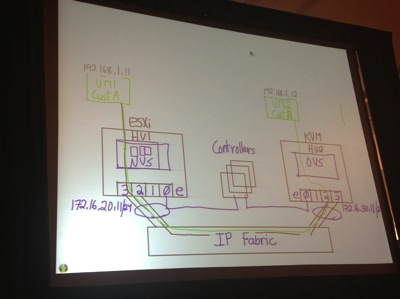
NSX Whiteboard Sketch

The Whiteboard snapshot above was drawn to demonstrate the basic components of NSX and how VMs communicate using the virtual overlay netowrk

The example uses ESXi on left and KVM hypervisor on right (HV1 and HV2)

  • Each connected to IP fabric
  • 3 controllers drawn in the middle
  • Intelligent Edge NVS installed on ESXi and OVS installed on KVM
  • Controllers talk with ESXi on vmkernel management interface, something similar with KVM
  • Addresses assigned that used for encapsulation and direct communication between hypervisors: 172.16.20.11/24 on left, 172.16.30.11/24 on right
  • Customer A is green, they have a VM on each hypervisor (192.168.1.11 on left, 192.168.1.12 on right)
  • Customer B is red, they have VM on each hypervisor with SAME IP ADDRESSES - logically separated similar to VRFs (I didn't get a picture of this--sorry) 
  • Controller cluster controls virtual ports, so they can programmatically control QoS, Security, Distributed Routing
NSX Hands-On-Lab HOL-SDC-1303, continued
I was able to continue, but not yet finish, the NSX lab I started yesterday in the VMworld Hands-on-Labs (HOL-SDC-1303). This portion of the lab went into more technical detail surrounding the following diagram:

Screen Shot 2013 08 27 at 4 02 07 PM

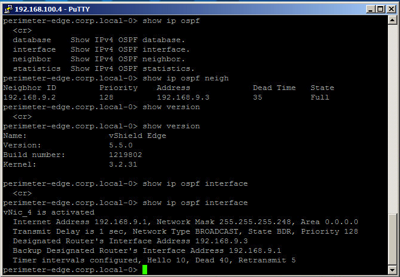
The network drawing depicts a 3-tier web application which includes web, application, and database servers. Each server tier is on a different subnet, and thus connected to a different port group. The NSX Edge shown acts as the external layer 3 (L3) gateway for each subnet shown in blue, green, and orange.  At the beginning of this lab section we verify the web app is working properly by connecting to the website and verifying data is served from the back 2 tiers (application and database servers).  Then we disconnect the NSX Edge from the App and DB subnets/port groups and validate that the website is broken (can get to web servers but get an HTTP error saying service not working).  Next, we connect to the vCenter web client and verify that each cluster is configured and loaded with the virtual router and virtual firewall components of the NSX suite, and we configure the router and firewall to connect to the App and DB tiers and allow the appropriate traffic. Finally we verify that service is restored on the website. Part of the configuration includes OSPF connectivity between the virtual distributed router on the ESXi hosts and OSFP running in the NSX Edge routing engine. Looking at the snapshot below of the NSX Edge you can see the similarities with Cisco IOS. For instance, "show ip ospf neighbor" and "show ip route" commands are identical.
Screen Shot 2013 08 27 at 3 51 27 PM
 
I hope to complete this lab tomorrow.
 
What is DevOps?
While spending some time in the Solutions Exchange I discussed what DevOps means with someone involved in that space at the Cisco booth.  As I understand it, companies usually first get virtualized, then they implement a service catalog, then they implement a "cloud" such that it's self-service enabled. DevOps refers to IT working closely with developers such that they create the development environment as well as production environment that the developers will deploy to. If you know more about DevOps and I've misunderstood, please keep me honest.
 
VMware IT Business Management Suite 
Finally, in the VMware booth I learned about the VMware IT Business Management Suite. It enables companies to understand costs and, as I understand it, implement chargeback to IT's internal customers. The demo looked pretty impressive, and I think there is a lot of value in such a tool. It can pull General Ledger data directly from standard systems such as Oracle and SAP and presents data in a well-thought-out manner. It's something to share with the CIO and/or accounting folks back home.

Tuesday, August 27, 2013

VMworld Monday Lessons Learned

Started out a productive day with my first-ever Fritatta and some delicious croissants at breakfast in Moscone South.  Having seen the debacle of "breakfast" at last year's VMworld, the seating this year was at least an improvement with areas available in both Moscone South and West.

I went to the General Session at 9am, but as I was seated towards the back I couldn't see the bottom of the screens. There were no screens overhead, only 3 or 4 large screens up front. In addition, the vmworld2013 wireless SSID was nowhere to be seen. The Press SSID (vmwaremedia) was available but locked down. Attempts to use my AT&T MyFi were stifled due to the overwhelming RF interference in the area. And I had AT&T cell coverage but no throughput.  Having seen how well wireless CAN be delivered at Cisco Live, even in this kind of space for 20,000+ people, I was very disappointed.  I decided to go watch the Keynote from the Hang Space, but that was full to capacity with a line waiting to get in. I finally gave up and walked over to Moscone West, 3rd floor, and sat at a charging station watching the live stream while waiting for my first breakout session. (Kudos at least for the stream working.)

My first session was "Moving Enterprise Application Dev/Test to VMware’s internal Private Cloud -- Operations Transformation (OPT5194)." This was a great story of how leadership from the top pushed VMware to implement Infrastructure as a Service (IaaS). Kurt Milne (@kurtmilne) (VMware Director of CloudOps) and Venkat Gopalakrishnan (VMware Director of IT) shared lessons learned during VMware's internal implementation of a service catalog and the automation of processes which used to require manual intervention by cross-functional teams over the course of weeks.  The process of standing up a new Software Development Life Cycle (SDLC) series of dev/test/uat/stage/prod environments has been greatly automated and provisioning time reduced from 4 weeks to 36 hours and they plan to reduce it to 24 hours in the near future.  If you're going through a similar journey in your organization, this session is a must see when recordings and slides are released after the conference. I believe the session was also live-tweeted by @vmwarecloudops.

The other session I attended today was the very popular "What's New in VMware vSphere" presented by Mike Adams (http://blogs.vmware.com/vsphere/author/madams). We reviewed some of the new features released in vSphere 5.1 last year as well as some of the changes made for vSphere 5.5 this year.  Some key takeaways for me (your mileage may vary):

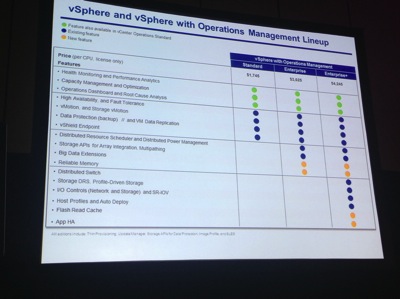
  1. vSphere is now wrapped up with Operations Management, i.e., vCenter Operations Manager (vCOPS). Referred to as "vSphere with Operations Management" it's now available in the Standard, Enterprise, and Enterprise+ flavors, each of which includes vCOPS Standard. See snapshot of feature breakout and license cost.
    VSphere with Ops Mgmt Cost Features Chart
  2. vCloud Suite variations all include vSphere Enterprise+, vCloud Director (vCD), and vCloud Networking and Security (vCNS). The individual flavors depend on the version of vCOPS and vCloud Automation Center (vCAC) which are Standard, Advanced, and Enterprise. In addition, the Enterprise SKU also includes vCenter Site Recovery Manager (vC SRM).
  3. vSphere Web Client is replacing vSphere Windows Client, so we "better get comfortable with it." If I understand correctly, vSphere 5.5 includes support for all functionality in the Web Client now but not the Windows Client.
  4. New features in vSphere 5.5 include: VMDK file support up to 62TB, 4TB memory per host, 4096 vCPUs per host.
  5. vSphere Replication allows full copying of workloads, including the VMFS files, without shared storage. This perhaps saves the cost of more expensive synchronous or asynchronous storage replication, but has a somewhat limited Recovery Point Objective (RPO) of about 15 minutes.  Still, this may be a good fit for some organizations for DR (including mine).

In addition to the sessions I was able to complete three labs (between yesterday and today) all related to VMware's recently announced vCloud Hybrid Service (vCHS). HOL-HBD-1301, HOL-HBD-1302, and HOL-HBD-1303 give a good introduction to the components and steps necessary to migrate workloads from a vSphere or vCloud Director environment in your own datacenter to the vCHS environment, as well as networking & security components and managing the service. 

One big announcement during the morning General Session/Keynote was the release of VMware's network virtualization product called NSX.  This is the marriage of Nicira (an earlier VMware acquisition) and vCNS/vShield in a new product.  As a network engineer by background and training, this is particularly interesting to me. I was able to start the NSX lab (HOL-SDC-1303) but couldn't yet finish as I ran out of time. I plan to finish tomorrow. More to come on that.

I have to give a big thumbs-down to VMworld's requirement that we all get our badges scanned as we enter lunch.  I don't remember this last year, nor have I ever seen this at any other conference I've attended.  What gives?  It's hard to hold a herd of hungry humans back from the food!

Finally, I visited with some fine folks at the Rackspace booth in the Solutions Exchange, including Waqas Makhdum (@waqasmakhdum). I now understand that Rackspace's Openstack platform uses a different hypervisor solution than VMware or Amazon EC2, but they offer guaranteed uptime with a phone number to call for support and apparently pretty reasonable costs for running a VM you control or even hosting the VM and just having you run your application on it. Also, I learned they offer VMware-based Managed Virtualization to allow you to "Set up a single-tenant VMware environment at our data center, rapidly provision VMs, and retain full control using the orchestration tools you’re familiar with." (Ref: http://www.rackspace.com/managed-virtualization/)

I'm failing to mention all the great people I met and conversations but one would expect nothing less from a great conference!

Sunday, August 25, 2013

Swack's VMworld To-Do List

Vmw2013 banner hero sf key preReg

It's time for VMware's 10th Annual VMworld conference in beautiful San Francisco!  This is my second trip to VMworld and I'm looking forward to making it my best one yet. As such, I'd like to share some of my goals for this week. I feel that publishing my objects tend to keep me motivated.

1. Gain better understanding of NSX (came from vCNS/vShield and Nicira) and dive more into details of VMware networking

2. Better understand OpenStack and maybe take a test drive

3. Learn some basic functions of PowerCLI

4. What is DevOps all about?

5. Set up vCloud Director and/or vCenter Orchestrator and try it out

6. Learn about VMware's Internal Private Cloud for dev/test workloads

7. What is Cloud Foundry and how does it relate to my company?

If you have insights or can point me in the right direction please do! Comment below or find me on Twitter (@swackhap).

-Swack

Thursday, June 27, 2013

Cisco Live Thursday Lessons Learned

My first session today was BRKRST-3114, The Art of Network Architecture, presented by Denise Donahue (@denise_donohue), Russ White, and Scott Morris (@ScottMorrisCCIE). They talked about how architecture is "the intersection of business and technology" and went into detail about how to better understand a customer by doing a SWOT analysis (stands for Strengths, Weaknesses, Opportunities, and Threats). Having been in the Air Force for over 5 years I really appreciated that Russ, who is also an Air Force veteran, introduced the audience to the concept of an OODA loop (Observe, Orient, Decide, Act). In the military, we were taught that you want to shrink your OODA loop to be smaller than your enemy's in order to defeat them. Similarly in business, you want to shrink your OODA loop smaller than your competition by best employing IT resources to help your customer succeed.
 
I was able to spend some more time in the World of Solutions expo where I visited some areas of the Cisco booth. I'm working on a project to replace some access switches as well as their aggregation point. When I mentioned the plan to use Catalyst 3750X switches for access, I was asked "why not 3850s?" Based on my conversation with the engineer, the Catalyst 3850s (see data sheet here) come in 24- and 48-port variants and have 3 options for uplink module: 4x1G, 2x10G, and 4x10G. The 3850 is the same price as the 3750X and has better performance capabilities with these caveats:
  1. Can only stack up to 4 currently (should be updated in Fall 2013)
  2. Not every feature supported by 3750X is supported by 3850 yet
  3. The 3850 runs IOS XE whereas the 3750X runs IOS
For the aggregation, I believe the best option to support 27 network closets, each with 2x10Gbps uplinks, would be a pair of 4500X switches (see data sheet here) configured as a VSS pair. Each 4500X can be ordered with either 16 or 32 onboard 10G ports and includes an expansion slot to support an additional 8x10G ports for a max total of 40 ports of 10G. Each 4500X would be ordered with 32 ports (and no expansion module) to support 27 closets plus 2x10G uplinks to the core Nexus 7k. This is another great example of how spending 10 minutes at Cisco Live can save literally hours of research online and/or discussion with my account team.
 
My last session of Cisco Live was the annual end-of-the-week panel presentation and discussion with the NOC team. Session PNLNMS-3000, titled Cisco Live Network and NOC, was moderated by Jimmy-Ray Purser (@JimmyRay_Purser) of Techwise TV. I took the opportunity to live-blog the event using the hashtags #clus and #noc. Below is a transcript of the live tweets in reverse chronological order. (Sorry, I couldn't figure an easy way to reverse them.) This year's show went VERY well for the NOC team, particularly for wireless. Well done Cisco Live! Thanks to Keith Parsons (@KeithRParsons) for referring me to http://allmytweets.net to easily copy and paste them here.
  • .@JimmyRay_Purser did a great job moderating this panel #clus #noc 
  • Applause for question managers that have been answer questions in the #clus app #noc 
  • Q: How many boxes got stolen this year? A: 1 classroom switch and an AP and switch loaned to vendor #clus #noc 
  • Question: was there a noticeable uptick in HTTPS over HTTP over last year? Answer: Yes #clus #noc 
  • They used @Splunk to help with security analysis of firewall logs, etc. #clus #noc 
  • The esteemed #clus #noc panel http://t.co/ho2jPjDpZg 
  • Mobile app developed outside of Cisco, delay due to CA cert used and not the network (maybe a cert check?) #clus #noc 
  • Things were rushed with the mobile app, lessons learned, they plan to make experience smoother next year #clus #noc 
  • HTTP data is still being processed for top websites used, NetMan might publish blogpost about it when done #clus #noc 
  • All other controllers for session rooms and hallways ran v7.3MR #clus #noc 
  • WoS controllers started on v7.3, needed more tweaks based on devices seen, so moved down to v7.2 to gave the “knob” needed #clus #noc 
  • They have months of WebEx sessions in advance to prep for show #clus #noc 
  • Collaboration done over Google Docs in many cases to share IP address info, etc; used Push-to-talk radio to communicate on-site #clus #noc 
  • IPv4 used exclusively for NetMan, IPv6 only used for DHCP #clus #noc 
  • no IPv4 was provided in WoS wireless to ensure stability and reduce the load that would have been needed for IPv6 multicast #clus #noc 
  • Jimmy-Ray is taking questions. Anybody? #clus #noc 
  • “Thank you for exercising our network and attending Cisco Live” #clus #noc 
  • Network was 100% reliable for the duration of the show #clus #noc #applause 
  • video streaming exceeded HTTP for traffic breakdown #clus #noc 
  • Vendors would sometimes shut off things, including switches in rooms, to help save power #oops #clus #noc 
  • Intelligent Automation - allowed users to use web portal to switch a port to a particular vlan without knowing details #clus #noc 
  • switches would use EEM to figure out themselves what VLAN they were on by pinging all possible gateways then self-configure #clus #noc 
  • Used EEM to set port descriptions based on CDP neighbors plugged in (embedded automation) #clus #noc 
  • used Cisco Prime LMS to help provision IDF and room switches #clus #noc 
  • …Prime Infrastructure, StealthWatch, Plixer; syslog also sent to FreeBSD and forwarded to interested parties #clus #noc 
  • Flex Netflow sent from 6500 core and dist switches to FreeBSD VM “exploder” which forwarded to other collectors… #clus #noc 
  • SNMPv3 authPriv (SHA/DES) with ACLs, NAM 2304 appliance used to traffic volume and utilization #clus #noc 
  • Joe Clarke - Network Mgmt - very impressed with a lot of Network Academy folks he worked with #clus #noc 
  • peak 10k IOPs, peak data rate 140MB/s #clus #noc 
  • Colo storage: Sunnyvale NetApp FAS2240-4 26 TB total cap, mirrored to it from local DC each night for backups #clus #noc 
  • 12 TB provisioned to VMware x2 mirrored to HA partner, 28% saved on dedup, 8.6TB used on disk #clus #noc 
  • 18TB provisioned to VMs (mostly thick provisioned); 6TB saved by thin provisioning; 14TB physical capacity avail #clus #noc 
  • Self-paced labs used virtual desktops running on NetApp storage with UCS #clus #noc 
  • All recordings from all sessions go to this storage, higher workload than last year, video surveillance stored on UCS local disk #clus #noc 
  • NetApp FAS31240 HA Pair, 2x DS2246 Disk Shelves, same equipment as last year #clus #noc 
  • Patrick Strick - NetApp in Datacenter #clus #noc 
  • Physical safety and security - 6001 events consumed, 12 physec tickets, monitoring based on motion detection #clus #noc 
  • security analytics: 1.2B events sysloged; 12 events resulted in FW blocks #clus #noc 
  • Adam Baines - remote monitoring services: core fault mgmt, security event, physical safety and security video #clus #noc 
  • Bus cams used DMVPN over LTE, worked very well #clus #noc 
  • He has some interesting footage of us coming back from CAE last night on the buses #clus #noc 
  • Able to analyze lines of people to help optimize for future events #clus #noc 
  • 6TB data storage consumed for video surveillance, 35 mobile cams on hotel shuttles, running on UCS in DC #clus #noc 
  • Physical Security with Lionel Hunt, worked with John Chambers head of security, 45 cameras deployed, 2Mbps per camera #clus #noc 
  • Some people doing call-home to botnets - check your stuff #clus #noc 
  • maxed around 1000 conns/sec, FWs never passed 7% CPU #clus #noc 
  • 26.5 TB transferred through firewalls through the week #clus #noc 
  • No firewall failover even when cables were removed and replaced during full production at 800Mbps of throughput #clus #noc 
  • Secure Edge Architecture, ASAs deployed in transparent mode active/standby HA, failover only occurs when 2 ints failed #clus #noc 
  • ASA5585X SSP-60, 2 pair, IPS-SSP-60 (4) for IPv4; ASA5585-X SSP-20, 1 pair, IPS-SSP-20 (2), for IPv6 #clus #noc 
  • Security - Per Hagen; CSM 4.4, Cisco Cyber Threat Defense #clus #noc 
  • Apple 6K clients, Intel 2k clients, Samsung 953 clients total for week #clus #noc 
  • 60% clients on 2.4GHz, 1 on 802.1b, 171 802.11a, 300 802.11g #noc #clus 
  • Peaked at 13.4K clients Tues and Wed, today crossed 10K clients on wireless, 293 per AP for the big rooms #clus #noc 
  • 180x3502P w/Air-ANT25137NP-R stadium antennas to cover keynote and WoS #clus #noc 
  • 300x3602 APs in hallways/sessions rooms in OCCC, 110x3602 APs in Peabody, 87 in-house APs for some cove ration in OCCC #clus #noc 
  • 7x58 controllers for session rooms, hallways, and Peabody; 3x5508 controllers for Keynote and WoS areas; 4xMSE 7.5 for Location #clus Noc 
  • Mir Alami - wireless - TME, very happy about how well things went this year #clus #noc 
  • EEM scripts and Twitter’s API were used to tweet from @CiscoLive2013 account for distribution Switch #clus #noc 
  • Quad redundancy with Quad Sup SSO, new feature as of May, 15.7K unique IPv4 macs, 7.8K unique IPv6 macs #clus #noc 
  • …Flex Netflow on Sup2T for IPv4 and IPv6 traffic; 1TB of multicast traffic during show #clus #noc 
  • VSS Quad-Sup SSO and Multichassis Etherchannel, OSPF and BGP for IPv4 and IPv6, SNMPv3, CoPP, Syslog, etc for NetMan…#clus #noc 
  • Connection was also provided to Peabody’s 4500 switch(es) for their meeting rooms #clus #noc 
  • 2x6509E VSS, Sup2T, 40G backbone; Dist: 2x6513E + 2x6504E, Sup2T, 40G Ethernet #clus #noc 
  • Divya has done several shows last few years including Interop core #clus #noc 
  • Next up: Divya Rao, Switching Backbone #clus #noc 
  • Multi-hop FCOE used in DC with N7004 pair but ran into problems…solution was multiple VDC #clus #noc cc/ @drjmetz @ccie5851 
  • IPv4 220K PPS Denver, 74K PPS Sunnyvale; IPv6 12.7K PPS…8% traffic was IPv6 on avg #clus #noc 
  • Local AS 64726…”thank you for stressing my network”…940Mbps from Denver, 615Mbps from Sunnyvale peaks #clus #noc 
  • RPKI validation tested this year with SoBGP for IPv4 and IPv6 for full Internet routing table #clus #noc 
  • Sunnyvale, Denver uplink sites for Centurylink #clus #noc 
  • Networking Academy had 40 people here all week #clus #noc 
  • CenturyLink ISP had rep on-site all week. Savvis provided DC services #clus #noc 
  • Routing and DC: Patrick Warichet #clus #noc 
  • 8 panelists will each present for 7 mins #clus #NOC 
  • PNLNMS-3000 Cisco Live Network and NOC, with Jimmy-Ray Purser #clus 

Cisco Live Wednesday Lessons Learned

My first session today was BRKARC-3472, NX-OS Routing Architecture and Best Practices presented by Arkady Shapiro, Technical Marketing Engineer (TME) for NX-OS and Nexus 7000. I thought Arkady was very entertaining and engaging as he delved into the depths of L3 on the N7K. Some of my key takeaways (may or may not be important in your line of work):
  1. Routes can be leaked between VRFs by enabling "feature pbr" and setting up route-maps with "match ip" statements and linking them with "set vrf" commands. (ref: slide 50)
  2. Routes can be leaked with VRF-lite without an MPLS license by redistributing IGP into BGP and using "route-target export" and "route-target import" commands under the BGP routing configuration of each VRF. (ref: slide 52)
  3. Auto-cost reference bandwidth by default is 100Mbps in IOS but 40Gbps in NX-OS.
  4. BGP best-practice is to use "aggregate-address a.b.0.0/16" under BGP routing configuration. Do NOT use "network a.b.0.0/16" under BGP routing configuration. Do NOT use "ip route a.b.0.0/16 Null0" under VRF. The reason is that if "network" statement matches a static route to null0, MPLS traffic to that route may be dropped. (ref: slide 92)
For lunch I had the opportunity to spend time with some of Solarwinds Head Geeks (@headgeeks) for two lunch-n-learn styled presentations. The first session, called "Don't Forget The Superglue," was introduced by Carlos Carvajal (Market Strategy) and presented mainly by Patrick Hubbard (The Head Geek). The reference to "superglue" alluded to the tools that Solarwinds offers to help in day-to-day running of the network and IT in general. Tools mentioned included:
  1. Web Help Desk - automated ticketing, asset management, knowledge base, communication
  2. Network Configuration Manager (NCM) - automatic config backup, realtime change alerts, compliance reporting
  3. Firewall Security Manager (FSM) - Java-based, runs on workstation, automated security and compliance audits, firewall change impact modeling, rule/object cleanup and optimization, can download configs from firewalls directly or from NCM
  4. Network Topology Mapper (NTM) - successor to LanSurveyor - network discovery, mapping, reporting, can export maps to Orion and open them in Orion Atlas
The second session covered some recent updates to Orion Network Performance Monitor (NPM) v10.5. Again introduced by Carlos Carvajal, this was presented by Michal Hrncirik, Product Manager for several of Solarwinds' applications. A couple key items that interested me:
  1. Interface discovery can be filtered for import - for instance, you can tell it to only select trunk ports and not access ports on switches, then it will show you a list of all ports and the devices they belong to so you can manually uncheck ones you don't want to import.
  2. Route monitoring - NPM will poll routes from the routing table. Although Michal said EIGRP isn't yet supported, I have actually seen EIGRP routes pulled from my IOS and NX-OS routers. The IOS routers showed them labeled as EIGRP (I think) and NX-OS showed them as "Cisco IGRP" in Orion. I'm pretty excited about the possible alerts we can set up with this type of monitoring.
Many thanks to Kellen Christensen (@ChrisTekIT) for taking the time to talk with me about his experience with Palo Alto firewalls. 

Tuesday, June 25, 2013

Cisco Live Tuesday Lessons Learned

My first session today was BRKRST-2336, EIGRP Deployment in Modern Networks. This was a new session presented by Don Slice and Donnie Savage (@diivious), who have been managing EIGRP since 1995. I've attended Don's "Care and Feeding of EIGRP" in past years at Cisco Live, and it's always a pleasure to attend his presentations. My key takeaways:
  1. EIGRP is no longer proprietary. Cisco has published an IETF Open-EIGRP Informational Draft. This means other companies can now implement EIGRP into their products if/when customers demand it.
  2. Neighbor authentication done with MD5 is no longer secure enough, so they've implemented SHA2-256 Hash-based Message Authentication Code (HMAC) to protect EIGRP messages exchanged between routers.
  3. The advent of 10Gbps links made it necessary to change the formula used to compute EIGRP metrics, now referred to as Wide Metric Support. They mentioned this was supported as of EIGRP release 8 and that the "show eigrp plugin" command would show version, but I tried on an NXOS and IOS router in my network and those commands didn't seem valid.
  4. How many of us enterprise customers use EIGRP in the LAN and have to redistribute with BGP for MPLS circuits? The problems inherent in this redistribution (which I have personally experienced, sometimes painfully) led them to create a new feature called Over the ToP (OTP) which uses LISP to bridge two EIGRP-speaking "CE" routers across a provider's MPLS cloud. One of the CE routers acts as a "route reflector" (term stolen from BGP) to consolidate route sharing amongst multiple CE routers connected to the MPLS cloud. OTP is shipping this month or next for IOS XE, then IOS in November.
The Opening Keynote this morning was hosted by Cisco Chief Marketing Officer Blair Christie (@blairchristie) and feature the perennial presenter John Chambers as well as Cisco CTO Padmasree Warrior (@padmasree) and Cisco's "Chief Futurist" Dave Evans (@davethefuturist). The presentation focused on the evolution of the "Internet of Everything" or IoE. As sensors shrink and become wearable, we will continue to be surrounded more and more by connected devices that will, according to Dave, eventually become self-aware. The obvious comparison to Skynet (http://en.wikipedia.org/wiki/Skynet_(Terminator)) was shared amongst the folks I was sitting next to. I for one WELCOME our new robot overlords. ;-)
 
I also attended BRKVIR-2019 Hypervisor Networking: Best Practices for Interconnecting with Cisco Switches. This was an excellent overview of basic networking terms and what they mean from the perspective of VMware vSphere, Microsoft HyperV, and Citrix XenServer Hypervisors. This session helps translate the terminology used by the hypervisor vendors to the terminology that Cisco uses for switch connections.
 
I was able to spend a bit more time on the expo floor, a.k.a. the "World of Solutions" (WoS). Some awesome TAC engineers in the Technical Solutions Clinic were able to help me figure out something with a Nexus 7000 that had been puzzling to me for quite some time. I popped my laptop open, connected to my company's network, and got on the N7K while the TAC folks watched over my shoulder. (By the way, I'm very impressed with the CiscoLive2013 conference wireless which, in past years, hasn't worked at all on the show floor.) I can't overemphasize how AWESOME it is to have these TAC folks here. Just being near them makes me feel smarter through osmosis.
 
As I have been researching IPAM vendors, I also visited BlueCat Networks and Infoblox and got to geek out with an engineer at each of their booths while they showed me their respective products.  Both seem solid, intuitive, and easy to use, and even though BlueCat has a plugin for VMware automation I've heard a lot more about how well integrated Infoblox is with VMware's vCenter Orchestrator and vCloud Director. In addition, Infoblox seems to have a unique way to visualize the IP networks as well as subnets and IP ranges within them that are available, assigned via static or DHCP lease, etc. I would need to see significant savings or other benefits compared to Infoblox to be convinced that Bluecat is the way to go, at least for my company.
 
It almost goes without saying at this point that I met more fantastic folks today, both in sessions and through Twitter, that continue to make this an amazing and rewarding experience. 

Monday, June 24, 2013

Cisco Live Monday Lessons Learned

I attended great session today on Cisco's Overlay Transport Virtualization (OTV) supported on Nexus 7k and ASR 1k platforms (BRKDCT-2049 - click here if you have a CiscoLive365 account). OTV is an L2 datacenter interconnect (DCI) technology proprietary to Cisco that is meant to help solve certain problems of traditional L2 VPNs including pseudo-wire maintenance and to better support multi-homing. In my enterprise role, it's important to understand how we might be able to use this kind of tech for upcoming projects and be able to present supportable ideas to my partners in IT as well as the business we support.
 
Also on my schedule was Virtual Device Context (VDC) Design and Implementation Considerations with Nexus 7000 (BRKDCT-2121) by Ron Fuller (@ccie5851). I've had the good fortune of meeting with Ron in the past and continue to interact on Twitter, and he's especially helpful in answering questions (sometimes almost in real-time). The material was in great detail and is important for me since I helped install and continue to support a Nexus 7k routed core. A key takeaway is that VDCs on the Nexus 7k are industry certified under FIPS 140-2, Common Criteria Evaluation and Validation Scheme Cert #10349. NSS Labs also has certified it as PCI compliant. The bottom line is that many customers can now collapse their Internet Edge, DMZ, and Core switching requirements into a single pair of N7Ks. There's also support for FCoE to help converge storage and IP traffic in the datacenter.
 
Thanks to the power of Twitter (once again), I arranged a real-life meet-up with Phillip James (@security_freak) and Jake Snyder (@jsnyder81) to discuss 802.1x and NAC. Kellen Christensen (@ChrisTekIT) joined the discussion to learn from Phillip and Jake what it takes to implement 802.1x. It sounds like it's much easier to do with wireless than with wired! The statistic "95% of wired 802.1x implementations fail" was thrown out, which certainly grabbed my attention. My key takeaways from this conversation, some based on my own (feeble) knowledge:
  1. Go slow. Start with Monitor Mode, then Low Impact Mode, then eventually work your way to High Security Mode.
  2. Be realistic and up-front with all critical players (desktop support, printer support, help desk, key users, management, etc). Partner with them and help them understand that this "may hurt a little" (my words).
  3. Cisco's NAC appliance was replaced by Cisco Identity Service Engine (ISE) and supports RADIUS (basic as well as advanced functions defined in multiple RFCs). Cisco Secure ACS Server v5 is the current product that supports TACACS+. ISE doesn't currently support TACACS+. 
  4. Aruba ClearPass supports RADIUS and TACACS+ as well as similar functions compared to ISE (security policy, endpoint identification/profiling). 
  5. I need to research what exact features are supported on the 3750/3750E/3750X access switches we're looking to deploy this on as well as what exact features and RFCs are supported by ISE and ClearPass.
Another highlight of my day was meeting more Tweeps IRL (in real life) such as Matthew Norwood (@matthewnorwood). And many thanks to Amy Lewis (@commsninja) and her Cisco Datacenter team for hosting Waffle Club (ssh…the first rule about Waffle Club, is don't talk about Waffle Club). Lots of great discussions there and I look forward to many more!
 

Sunday, June 23, 2013

Cisco Live Sunday Lessons Learned

Sunday was Day 1 for me at Cisco Live. Here are my key takeaways.
 
I attended the 4-hour morning session LTRSEC-2014 "Basic Network Threat Defense, Countermeasures, and Controls" with Randy Ivener and Joe Karpenko. Whether you're an Enterprise or Service Provider, unicast reverse-path forwarding (uRPF) checks can enhance security and clean up logs from edge routers. Rather than using an ACL blocking packets sourced from undesired address ranges (e.g. RFC 1918 and RFC 5735) or spoofed from your own addresses, you can implement uRFP to black-hole the traffic in CEF. Benefits include cleaner logs and lower processor overhead (depending on hardware) because the uRFP check is done in CEF. You still need the ACL, but uRPF can help.
 
Many thanks to Ed Wheadon (@avalonhawk) for weighing in on my IPAM self-task (see my Cisco Live To Do List here). I didn't know anything about Windows Server 2012 including IPAM. I'll have to check that out.
 
Kathleen Mudge (@kathleenmudge) and her crack Social Media team did a GREAT job this year putting together a beautiful and functional Social Media Hub that was accessible from Day 1, and they continue to promote the Cisco Live conversation through building online relationships among attendees. Oh, and the Scavenger Hunt was a blast (and it's only just begun)!
 
So many great folks here! Looking forward to meeting so many more smart people.

Saturday, June 22, 2013

Swack's Cisco Live To-Do List

Cisco live2

My company pays a lot of money to send me here to Cisco Live. That's likely the case for you as well (if you're also here). I've had a list at past conferences of what I wanted to accomplish but never really published it outside my head. This year I'm holding myself more accountable and putting it here.  Many are things I could do quite easily back in the office if I didn't have distractions. Now I can focus AND talk to the smartest folks in the industry about how they do business. Here's some of the many things I hope to accomplish this year.

1. Better understand the Catalyst 4500 series and how I can use them as an aggregation point for 10-gig connected closet switches. I've never really worked with them so getting a better idea of how they work, benefits and drawbacks, and deployment options is key. How else could I provide resilient aggregation for 27 network closets with 2x10G links each?

2. Learn AMAP (as much as possible) about 802.1x and how Cisco switches and phones handle it. What are the deployment methods and models? How can we use certificates or other methods like MAC Authentication Bypass (MAB) for Cisco VoIP phones where we have a client connected behind the phone? What are the capabilities of Cisco Secure ACS and Cisco Identity Services Engine (ISE) and how do they compare with other RADIUS methods such as Aruba Networks Clearpass Policy Manager (CPPM) or just a simple Windows RADIUS server?

3. Talk more in detail with Solarwinds Head Geeks and other smart engineers about how the latest version of Orion NPM Route Polling works. How can we map over 1200 locations using Orion so our retail support teams can better take advantage of Orion's power and knowledge? How can we use Orion NPM and NCM to possibly replace our existing legacy Linux-based config generation tool for store routers and provision them in an automated way?

4. How should I troubleshoot high received errors on ASA and router interfaces (specifically 7200 series)?

5. What are my options for expanding a pair of 5548UP Nexus switches as I keep adding FEX and running out of ports? If I add another pair I add another point of management (boo!). If I replace with 5596s how do I handle the transition and what can I get for trading in the 5548s?

6. How can I get our NXOS gear properly sending syslogs to our syslog server? (I already know this is a great question for the TAC folks that are here.)

7. Learn more about how IP Address Management (IPAM) vendors can prepare us for an 802.1x deployment, especially in terms of learning our existing MAC addresses for a MAB table. I've heard of Infoblox and BlueCat. Any others worth looking at?

8. Get familiar with Cisco's Next Gen Firewall capabilities and how it compares to certain competitors, particularly Palo Alto Networks.

I welcome your comments/feedback below or directly on Twitter (@swackhap).

-Swack

Saturday, June 1, 2013

VMware View Problems with 64-bit Windows 7 Virtual Desktop

We've been growing our Virtual Desktop Infrastructure (VDI) quite a bit lately, and as a result I've taken ownership of a shiny new Windows 7 64-bit virtual desktop.  Unlike the 32-bit Win7 VM I used before, though, this one has been giving me trouble.

The trouble starts when I am trying to reconnect to the already booted VM from a machine other than the last one I was on.  Specifically, I use Windows 8 64-bit at work on a Dell tower with 4 monitors (two dual-monitor graphics cards).  I use my VDI VM all the time from that machine on all four monitors.  I also have a Macbook Pro (MBP) that I take to meetings and use outside the office.  

Sometimes (not always) when I re-connect to my VM from my MBP I get a black screen with a mouse cursor and nothing else.  After waiting a minute, I either disconnect or quit the View application and re-launch. Reconnecting the second time gives me an error indicating that desktop resources  are busy.  When this happens I cannot even connect via RDP, let alone through the usual way via the View broker. I attempt to restart the guest OS through vCenter but it never actually reboots unless I power cycle the VM in vCenter.  

I worked with VMware Support but unfortunately haven't been able to fully solve the problem.  The View support folks have looked thoroughly at our setup and don't see anything that could be causing problems.  They handed me off to another group that was able to analyze a crash dump of my VM after the problem occurred, but they could only tell me that it appeared the VM was trying to use 3D rendering services of some sort (if I remember correctly).  

As a workaround, I now re-size my View window on my desktop before disconnecting so it is intentionally smaller than the laptop from which I usually connect.  This seems to have helped but it's rather frustrating.  No other users have reported having the same issue, but there are currently no other VDI users with more than 2 screens.  I should also point out that I've observed the same behavior when I connect from my home Windows 7 machine.  It doesn't seem to matter if I'm connecting to the internal View servers that only use AD authentication or if I use the Secure Gateway View server that requires 2-factor authentication and tunnels secure PCoIP. 

Based on all the evidence it seems my problem is related to having 4 monitors, but VMware support has been unable to identify the root cause and neither have I.  If you have ideas, I'd love to hear them. Hit me up on Twitter (@swackhap).

Friday, February 8, 2013

How I Stopped Worrying And Learned To Love IFTTT Automation


Screen Shot 2013 02 09 at 1 08 18 AMI'm a bigfan of Evernote to help with everything from blog ideas to date ideas and more, and I particularly like sending e-mails to my personal unique SMTP address.  There are some notes that have a lot in common, so I was looking for some way to automatically filter and file based on title.  I found out that you can just use @folder #tag1 #tag2 at the end of the e-mail subject line to automatically have Evernote put the note into the folder named "folder" and tag it with the specified tags.  

As I continued to look around for ideas how to streamline my workflow, I was reminded of a service I had heard of called "If This Then That" or "IFTTT."  Now that I've spent an hour playing with the recipes I'm in LOVE! What an amazing service!  Facebook, Twitter, Blogger, WeMo, Instagram, Foursquare, and Google Reader are just some of the MANY "channels" you can log into from IFTTT. Then you create "recipes" by specifying cause and effect, or "this" and "that."  

As an example, I set up the "phone" channel with my cell phone, and had it call me to read a typed message. It was a clunky computer voice, but it called me right on schedule and got me the message. I may start using that to help me wake up to workout in the morning.  The catch is that it can only be scheduled at 15 minute intervals (:00, :15, :30, :45).  Still, pretty impressive, right?

Don't take my word for it. Go check it out for yourself! Set up your own free account at https://ifttt.com!

Oh, and for the heck of it, I'm going to have IFTTT tweet a message announcing this new blog post.  Let's see if this works...

Sunday, August 26, 2012

VMworld Hands-On Labs, Follow-Up

Vmworld2012 us live

In case you hadn't heard, VMworld became "VMwait" today as I, along with quite a few other strong-willed geeks, waited well over seven (yes, that's SEVEN) hours before being seated for our first Hands-On Lab (HoL). Despite the hardships sustained by all, including the folks in green shirts running the labs, we all came through it alive and stronger for it.  To make it up to us, they decided to stay open until 10pm at which time no new folks could enter but those of us that were there could finish what we started. Proudly, I managed to get three labs in (at least most of them) before heading back to my hotel for the night (sorry v0dgeball and VMunderground, I couldn't make it…maybe next year). Unfortunately, I heard some labs were still having problems even once they got the environment up and running. But luckily for me, I had fairly minimal issues and was able to learn lots!

I want to give a HUGE shout-out to Mr. Irish Spring who did an outstanding job listening to our feedback today and made sure we were supplied with refreshments when we got hungry and kept us informed.

Irish Spring

Also many thanks to Ms. Jennifer Galvin who spent some time chatting with some of us, listening to our (mostly justifiable) grumbling about the experiences of the day.

Jennifer Galvin

In all fairness to VMware, I understand that some of the back-side tech being used this year is different than last year (indeed, some of it isn't even being announced until Monday morning's keynote). They took a risk and ended up having some problems. It's certainly happened to me. I'm betting it has (or will) happen to you.

Hopefully tomorrow will be a better day for everyone involved with the labs.

IMG 0847

VMworld Hands-On Labs, First Look

My Sunday here at VMworld began with a good breakfast at a local bakery. I then headed to Moscone West shortly before the Hands-On Labs (HoL) were scheduled to open at 11am and was greeted with this scene:

IMG 0809

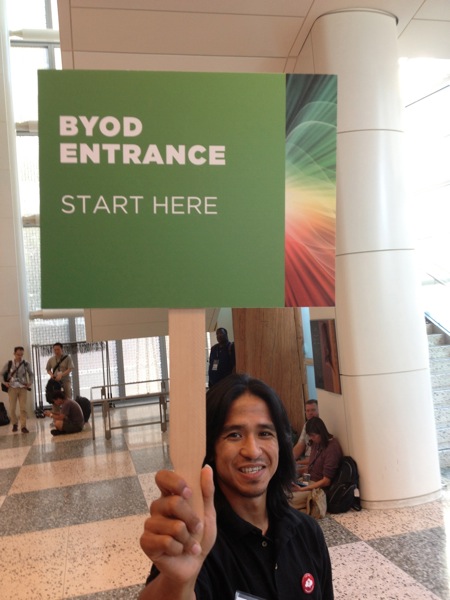
I was able to navigate through the Traditional HoL crowd to the slightly shorter Bring Your Own Device (BYOD) line, indicated by this nice guy:

IMG 0810

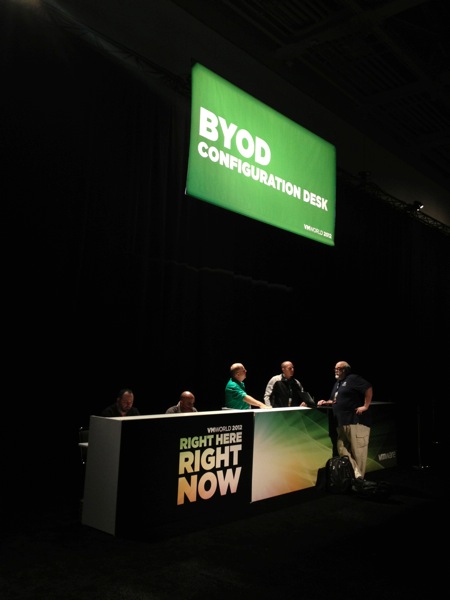
After the doors opened, I followed the line inside to the BYOD Check-In Desk. While in line, some very helpful green-shirted VMware folks explained how to prepare our machines for the HoL. After handing over my conference badge to the folks at the table, they entered me into the system and I proceeded to the BYOD Configuration Desk across the room:

IMG 0821

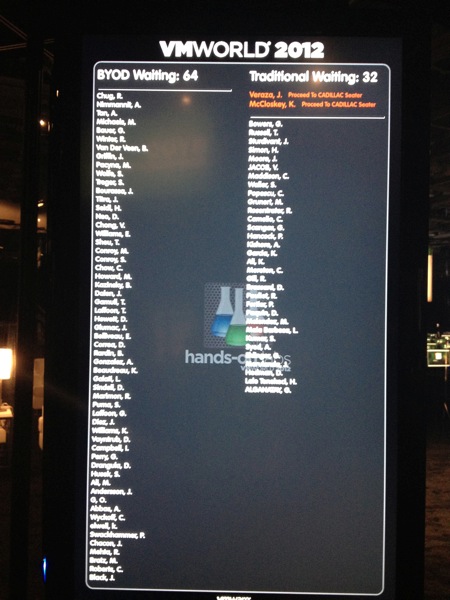
I'd decided to take someone else's advice and use my iPad to login to the http://vmwarecloud.com site from the HOL wifi (only available inside the HoL area). That way I can access the lab guide instructions on my tablet and then I could use my MacBook Pro to connect to the lab environment with the View Client. The waiting continued in the "Holding Tank" where I hung out with about 100 other folks waiting for my name to proceed up to the top of this screen:

IMG 0822

While waiting, they had a small seating area set up where the folks that wrote the labs were presenting whiteboard sessions:

IMG 0820

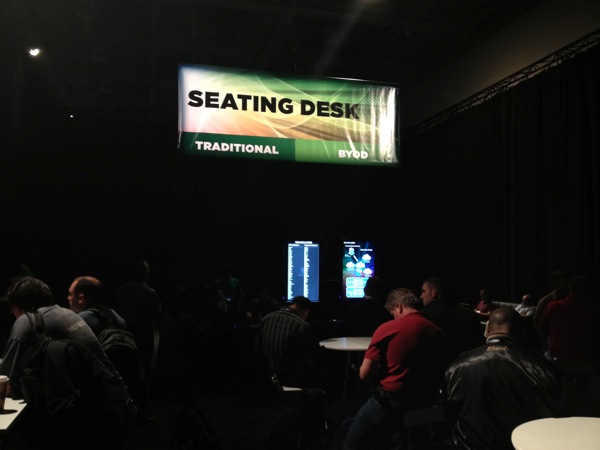
Once my name reached the top of the screen I headed to the Seating Desk where I obtained my password and access code to login to the HoL site.

IMG 0825

With this single-use code in hand I was guided to the BYOD HoL seating area where I set up to do my first lab! Based on what I've heard from previous VMworlds, I think it'll all be worth the wait.

See you on Twitter!

Saturday, August 25, 2012

VMworld 2012, Day 1

I'll admit it. I'm a newbie to VMworld. Yes, this is my first time.  But I've been to a few Cisco Live conferences (about 10 I think) so I've been eager to experience VMworld! 

I arrived at the San Francisco airport (SFO) this afternoon after a pleasant day of flying from St. Louis, and caught a cab to my hotel. FYI, it was about $50 and 25 minutes to the Westin at 3rd and Market.  After checking into the hotel, I walked a couple blocks to Moscone South to check into the conference.

Self Check-In had numerous Dell laptops prompting to enter first and last names. It then found me in the system and re-prompted for my first name (I assume in case I wanted to use a nickname). I hit submit and it told me which line number to stand in to pick up my badge and lanyard.

SECURITY NOTE: I'm concerned that they didn't ask to see my ID when they gave me my badge. This has been standard procedure at Cisco Live for years and I hope they just slipped up with it being the first day.

[Follow-up: I heard back from several folks on the VMworld Help group in the SocialCast conference community site. They ARE supposed to ask for ID and VMworld staff will address this with registration folks.]

With badge in hand (or rather, around my neck), I found out I had to head to Moscone West for Materials Pickup. (Side note: I'm looking forward to getting lots of walking in this week!)

Entering Moscone West you get this scene. Note that Self Check-in is available in Moscone South AND West locations.

IMG 0768

I decided to check out the wireless so connected to the "VMworld 2012" SSID on my iPhone. I tried browsing somewhere as a test, and a splash page popped up with a vendor advertisement (yawn) with a countdown timer ("5 seconds until launch"). However, the first time I tried it showed me this weird login screen:

IMG 0767

I walked over to the Technical Support desk near the Southeast entrance and asked about it. They indicated that it acted weird like that and I should try it again. When I did, voila, I got connected and it immediately directed me to the VMworld Mobile website (which I had already logged into earlier in the day).

IMG 0778

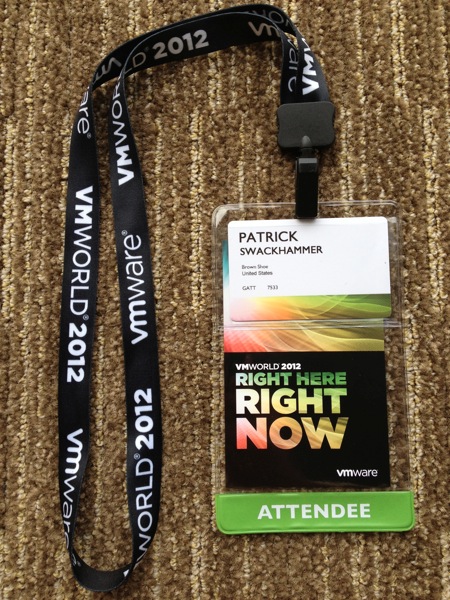
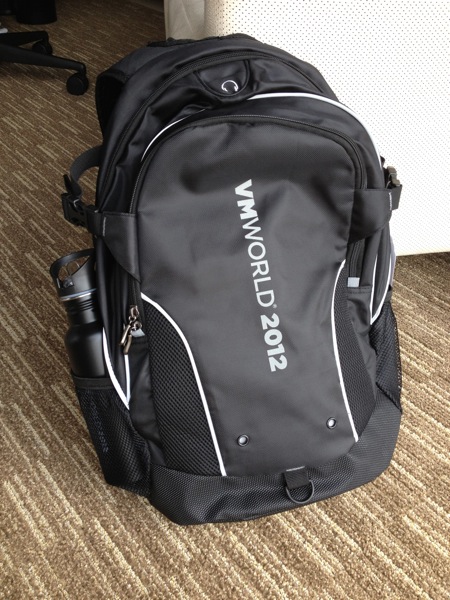
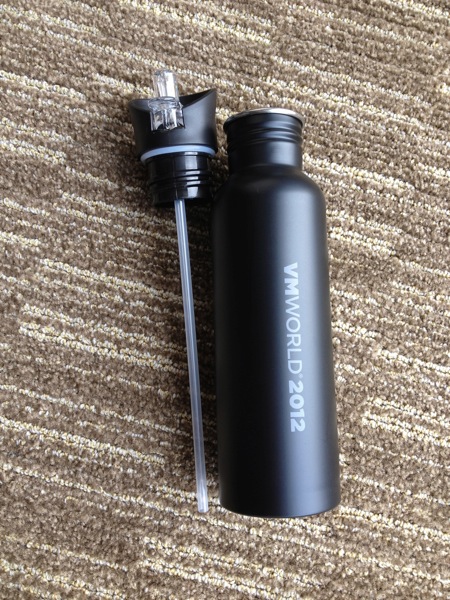
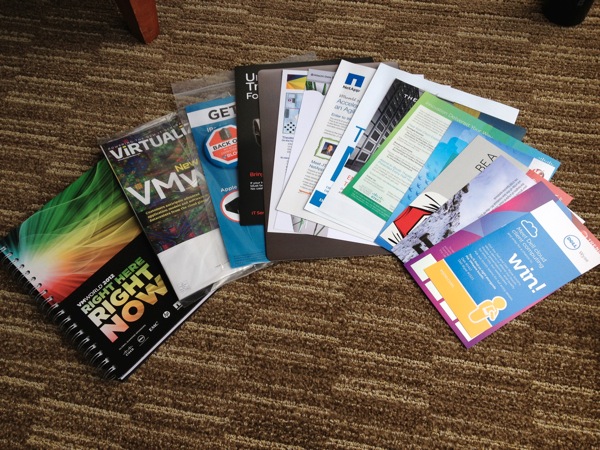
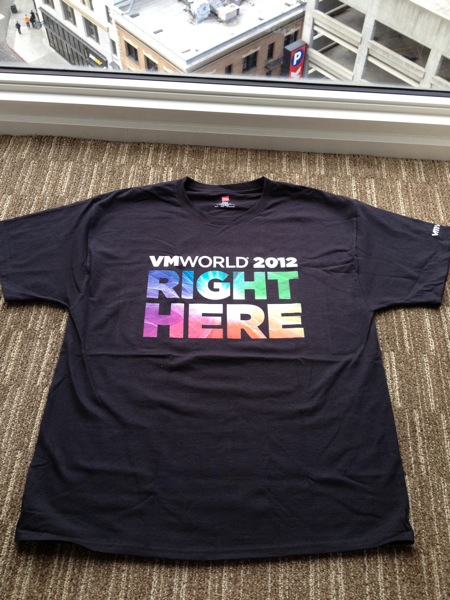
Having completed my mission for the day, I headed back to the hotel to do the "Backpack Unboxing" and take some photos, shared for you below.  I'm very excited to be here and grateful for the beautiful weather (it was about 67F when I arrived this afternoon).

Hit me up on Twitter (@swackhap) with your comments or questions, or leave a note below.


IMG 0777


IMG 0769

IMG 0770


IMG 0772

IMG 0771

IMG 0773

IMG 0774